As we all know most of the people are using facebook account. I'm assuming you love facebook, hanging out with old friends, making new connections, chatting when you're less busy and reading all those funny status updates on your news feed, right? Did you know your facebook account can be hacked?
You can loose access to your facebook account as there are ways to hack a facebook account but that is not what we're discussing in the context of this blog post, we're focusing majorly on how to protect your account from getting hacked.
I recently wrote a post on preventing your passwords from getting hacked but that was from a generalized point of view, the tips provided in this post are specifically for your facebook account.
1. Hide your primary email Your primary email is the email your facebook account is registered : I see a lot of people using free email providers like yahoo, hotmail and gmail and even showing this on their facebook profile. Once a hacker gets hold of your primary email, your facebook account is as good as gone. All that needs to be done is to use Forgot Password to reset your facebook password and a link is sent to your email which is already hacked! To prevent this, be sure your primary email is hidden. To do this, go to Edit Profile > Contact Information.
Change your primary email's visibility to Only Me.
2. Beware of facebook phishing and links you follow : Phising is a way to get certain data about you such as login details and credit card information by mimicking a trusted site. There are so many fake facebook login pages or profile on the internet and keying your username and password on any of those pages might just make you lose your facebook account. If you followed any link from your email or facebook news feed and you're asked to log in to facebook, check the address bar to ensure you're actually logging in to facebook or it might be just a fake log in page.
3. Enable login nofications : With facebook login notification turned on, you get to know immediately some crazy hacker gets access to your facebook account. Login in notification alerts you through SMS and email when a browser/device different from yours accesses your account. To enable it, go to Account Settings > Security > Login Notifications.
4. Don't accept every friend request : Someone once said people now take facebook as a popularity and I realize this is so true. Just because someone sends a friend request doesn't mean you must accept it. It's been proven that identity thieves and hackers do set up fake facebook profiles just to get close to their victims.
5. Set up a complex password Be sure your password is alphanumeric and can't be guessed. It should contain letters, figures and symbols all randomly mixed together and should be at least ten characters.lso be sure your facebook password isn't the same as your primary email account password.
6. Watch out for keyloggers : Keyloggers are programs installed on your computer to monitor every keystroke you make. Some keyloggers can be remotely installed on your computer without the hacker having direct contact with your PC.
Be sure your antivirus is up to date and perform regular scans. These tips doesn't guarantee you complete security but it's going to be real tough for anyone to gain access to your account if they're taken into practice. Hacking can't be totally prevented, but the chances of getting hacked can be minimized. Share the post with your facebook friends if it helps.
You can loose access to your facebook account as there are ways to hack a facebook account but that is not what we're discussing in the context of this blog post, we're focusing majorly on how to protect your account from getting hacked.
I recently wrote a post on preventing your passwords from getting hacked but that was from a generalized point of view, the tips provided in this post are specifically for your facebook account.
1. Hide your primary email Your primary email is the email your facebook account is registered : I see a lot of people using free email providers like yahoo, hotmail and gmail and even showing this on their facebook profile. Once a hacker gets hold of your primary email, your facebook account is as good as gone. All that needs to be done is to use Forgot Password to reset your facebook password and a link is sent to your email which is already hacked! To prevent this, be sure your primary email is hidden. To do this, go to Edit Profile > Contact Information.
Change your primary email's visibility to Only Me.
2. Beware of facebook phishing and links you follow : Phising is a way to get certain data about you such as login details and credit card information by mimicking a trusted site. There are so many fake facebook login pages or profile on the internet and keying your username and password on any of those pages might just make you lose your facebook account. If you followed any link from your email or facebook news feed and you're asked to log in to facebook, check the address bar to ensure you're actually logging in to facebook or it might be just a fake log in page.
3. Enable login nofications : With facebook login notification turned on, you get to know immediately some crazy hacker gets access to your facebook account. Login in notification alerts you through SMS and email when a browser/device different from yours accesses your account. To enable it, go to Account Settings > Security > Login Notifications.
4. Don't accept every friend request : Someone once said people now take facebook as a popularity and I realize this is so true. Just because someone sends a friend request doesn't mean you must accept it. It's been proven that identity thieves and hackers do set up fake facebook profiles just to get close to their victims.
5. Set up a complex password Be sure your password is alphanumeric and can't be guessed. It should contain letters, figures and symbols all randomly mixed together and should be at least ten characters.lso be sure your facebook password isn't the same as your primary email account password.
6. Watch out for keyloggers : Keyloggers are programs installed on your computer to monitor every keystroke you make. Some keyloggers can be remotely installed on your computer without the hacker having direct contact with your PC.
Be sure your antivirus is up to date and perform regular scans. These tips doesn't guarantee you complete security but it's going to be real tough for anyone to gain access to your account if they're taken into practice. Hacking can't be totally prevented, but the chances of getting hacked can be minimized. Share the post with your facebook friends if it helps.


 The original URL of the Facebook video is revealed once you play the video on a mobile device. Since we can open the Facebook’s mobile version on our desktop browser, we can download videos using this trick.
Follow these simple steps:
1.First open your Facebook video and then change the URL of that video From
The original URL of the Facebook video is revealed once you play the video on a mobile device. Since we can open the Facebook’s mobile version on our desktop browser, we can download videos using this trick.
Follow these simple steps:
1.First open your Facebook video and then change the URL of that video From  Do you want to hide your facebook profile photo from users that are not in your friends list? if you have some privacy concerns about sharing your profile photos with strangers or friends of your friends, you can set the privacy of all your profile photos where only you and your friends can see them, just follow the next steps to do that:
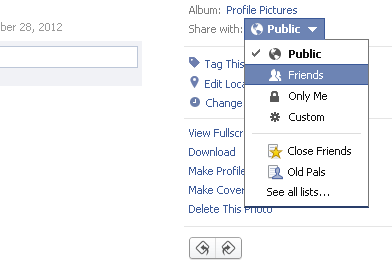 select whom can see your profile picture.
You can either choose friends or only me, you can also custom the photo's privacy for only specific persons to see it, or prevent others from viewing it, however if you want to make your profile photo private from strangers selectFriendsonly.
Only your friends now can see your profile photos.
Now your facebook profile pictures are well protected from strangers, If you want to change these settings back again, follow the same process and re-set the privacy for public. that's all.
I hope this article was helpful for you.
select whom can see your profile picture.
You can either choose friends or only me, you can also custom the photo's privacy for only specific persons to see it, or prevent others from viewing it, however if you want to make your profile photo private from strangers selectFriendsonly.
Only your friends now can see your profile photos.
Now your facebook profile pictures are well protected from strangers, If you want to change these settings back again, follow the same process and re-set the privacy for public. that's all.
I hope this article was helpful for you. Everyone knows Facebook.Facebook is an online social networking service.Facebook attempts to keep on top of scams and community standards violations, so if your account has been locked for security reasons, something about your account or activity has caught the attention of Facebook staff or its automated systems.
1.You didn’t use your real name. Facebook will find you and spit you out.
2.You joined too many groups. (The maximum limit is 200 groups per user.)
3.You posted in too many groups,too many user’s walls. (That’s what spammers do, silly.)
4.You friended too many people.(Not so long ago this was a prime cause of disabled accounts, but Facebook has instituted a maximum of 5000 friends that should protect you from yourself.)
5.Your school/organization affiliation is doubtful.
6.You’re poking too many people.(Beware the odd FB app that pokes on your behalf.)
7.You used duplicate text in multiple messages.
8.You are under 18 years old and not part of a High School group.
9.You posted too many messages on a wall or in a group.
10.You advertised your app on wall posts.
Everyone knows Facebook.Facebook is an online social networking service.Facebook attempts to keep on top of scams and community standards violations, so if your account has been locked for security reasons, something about your account or activity has caught the attention of Facebook staff or its automated systems.
1.You didn’t use your real name. Facebook will find you and spit you out.
2.You joined too many groups. (The maximum limit is 200 groups per user.)
3.You posted in too many groups,too many user’s walls. (That’s what spammers do, silly.)
4.You friended too many people.(Not so long ago this was a prime cause of disabled accounts, but Facebook has instituted a maximum of 5000 friends that should protect you from yourself.)
5.Your school/organization affiliation is doubtful.
6.You’re poking too many people.(Beware the odd FB app that pokes on your behalf.)
7.You used duplicate text in multiple messages.
8.You are under 18 years old and not part of a High School group.
9.You posted too many messages on a wall or in a group.
10.You advertised your app on wall posts. Facebook being one of the most popular social networking website.It allows many emotions and expressions and allow you to add any kind of others emotions by third party extensions or plugins that increase your chat experience. Emotions are being used in worldwide for show your feelings in characters.
You can send your profile picture (DP) in chat..
Follow These Simple Steps:
*.Login to your Facebook Id.
*.Go to profile which profile pic you want to send like smiles emotions.
*.Now copy the Url of that profile you want to send and save it in notepad.
*.Now copy the user name that is after "/" https://www.face book.com/zuck "Zuck"
*.Make the double square brackets on both the sides of user name like" [[Zuck]] ".
*.Hit Enter and see the magic.
Facebook being one of the most popular social networking website.It allows many emotions and expressions and allow you to add any kind of others emotions by third party extensions or plugins that increase your chat experience. Emotions are being used in worldwide for show your feelings in characters.
You can send your profile picture (DP) in chat..
Follow These Simple Steps:
*.Login to your Facebook Id.
*.Go to profile which profile pic you want to send like smiles emotions.
*.Now copy the Url of that profile you want to send and save it in notepad.
*.Now copy the user name that is after "/" https://www.face book.com/zuck "Zuck"
*.Make the double square brackets on both the sides of user name like" [[Zuck]] ".
*.Hit Enter and see the magic.